
01 project-aware github discovery
find open-source tools that fit the project in front of you.
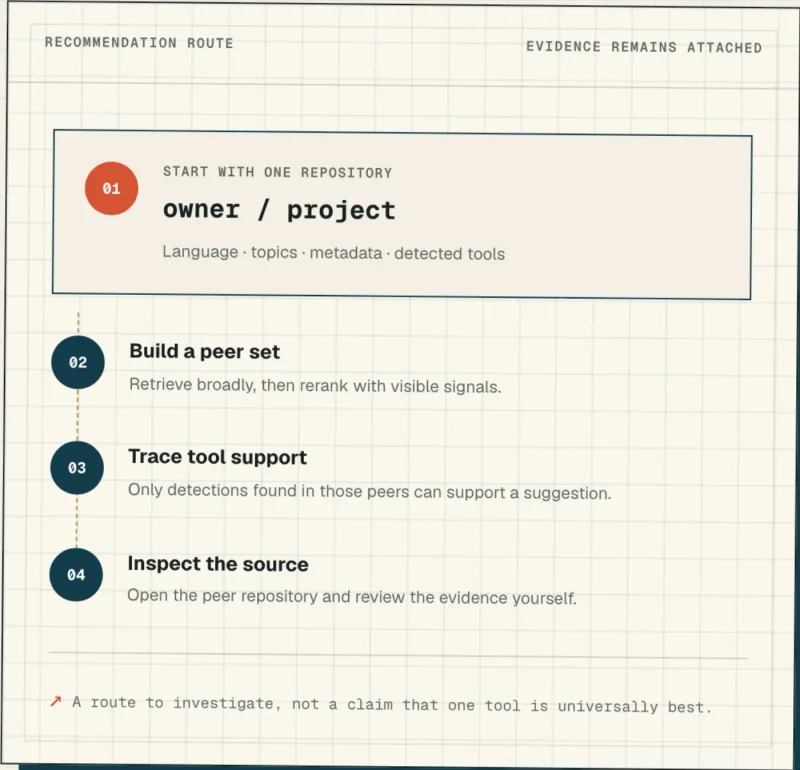
Paste a public GitHub repository. Starboard finds similar projects, then shows which tools those peers use and the exact repository evidence behind each suggestion.
recommendation route
a recommendation you can audit.
Starboard uses visible language, topics, repository metadata, and detected tools. Semantic, lexical, language, topic, and tool signals produce a bounded peer set. Sparse results are labeled as broader fallbacks. Tool suggestions name their supporting repositories and detection confidence, with direct links for manual review.
what starboard does not claim
No universal best-tool ranking. No complete dependency audit. No benchmarked recommendation accuracy. The final judgment stays with you.
know what happens before you click.
Starboard is free today. Signing in adds your GitHub context; it does not unlock a paid tier.
public waters
Search the seeded public catalog, open repository details, browse Tool Intelligence, and preview projects Starboard already knows. Cataloged previews and Discover are public. New lookups and saved projects use GitHub sign-in.
personal workspace
Choose your own public projects for saved recommendations, then search and organize the repositories you have starred over time. Lists, tags, notes, and starred-repository sync.
GitHub boundary
Public repositories, minimal read:user OAuth scope, and no GitHub write access. It does not claim access to private code.
cost
Free today, with no checkout, subscription, or premium-feature gate in the current product.
start with one public project.
See the peers, follow the evidence, and decide which tools deserve a closer look.